«Producir y nutrir,
producir y no poseer,
obrar y no retener,
acrecentar y no regir,
son el misterio de la vida.»
Algunos recursos de investigación sobre calidad del software aplicada a proyectos de software libre
Con la excusa de responder a una solicitud de información sobre este tema he preparado un repaso, informal e incompleto, OjO, de recursos relacionados que tenía en mente. Y ya puestos lo cuelgo en el blog. Aquí está.
- grupos de investigación
- Libresoft, de España, uno de los más antiguos al menos de Europa y han participado en muchos consorcios de investigación europeos relacionados: www.libresoft.es
- SOM, http://som-research.uoc.
edu/ , que parece que es mucho más nuevo, también español, aunque la UOC ha hecho cosas antes relacionadas con FLOSS
- proyectos de investigación europeos, algunos de ellos
dedicados principal o exclusivamente a calidad en OSS (http://cordis.europa.eu/fp7/
ict/ssai/projects-call5_en. )html - http://cordis.europa.eu/fp7/
ict/ssai/docs/ fossfactsheet2010_en.pdf - http://cordis.europa.eu/
project/rcn/105434_en.html - http://www.mosquito-fp7.eu/
- http://www.alert-project.eu/
- http://cordis.europa.eu/
project/rcn/80465_en.html - http://cordis.europa.eu/
project/rcn/79362_en.html - QualOSS
- Floss Metrics
- y seguro que me estoy dejando varios fuera.
- http://cordis.europa.eu/fp7/
- empresas
- Bitergia es una spinoff de Libresoft: http://bitergia.
com/ - están desarrollando y operando cuadros de mandos para proyectos OSS reales:
- y un nuevo producto: https://cauldron.io/
- Bitergia es una spinoff de Libresoft: http://bitergia.
- otros investigadores que recuerdo
- http://www.brian-fitzgerald.
com/open-source-software/ - Carlo Daffara es otro histórico:
- http://www.brian-fitzgerald.
- otros recursos:
- http://flosshub.org/
- https://www.openhub.net/ (antiguo ohloh)
- Coverity Scan;
- https://scan.coverity.com/
projects - Coverity® Scan Open Source Report 2014 https://na-sjf.marketo.com/rs/
157-LQW-289/images/2014- Coverity-Scan-Report.pdf
- https://scan.coverity.com/
- Y un ejemplo paradigmático de cómo debería ser el desarrollo
de software en general y de software libre en particular es este
informe de Michael Meeks sobre la publicación de la versión 5.0
de LibreOffice: https://people.
gnome.org/~michael/blog/2015- 08-05-under-the-hood-5-0.html
Sonic Pi packaged for Fedora
Maybe you know about Sonic Pi, the system to learn programming playing with music. Now I want to give it a try in my system (Fedora 23) and my sysadmin-TOC syndrome obligues me first to package it into RPM. Now I have good and bad news. The good news are I have a testing release of Sonic Pi for Fedora 23. It includes a desktop file too. The bad news are... it doesn't work yet. Sonic Pi uses jackd while a common Fedora Workstation uses pulseaudio and both try to manage the sound device by themselves.
After a quick googling seems possible to get a procedure for using some working configuration for puleaudio+jackd but I didn't have the time to find and check them. Meanwhile, if the RPM package is useful for someone here it is.
This package depends of Supercollider as provided by Planet CCRMA package repository. To use this Sonic Pi maybe you'll want to add the repository to your system.
Please feedback here if you know how to make sound to work.
PD: Post edited to add references to Planet CCRMA repositorie.
Running EPF (Eclipse Process Framework) in Linux
For many time I wanted to learn to use EPF bu technical reasons always stoped me. Blame me because I'm not an Eclipse guy and I'm not into its eclipse-isms but until today I have not been able to launch it. Now, wirth this really simple recipe you'll be able to run it.
Initial technical scenario:
- Fedora 23 Linux, 64 bits
- Oracle Java 64 bits (using 1.8 from Russian Fedora)
- Last release of EPF (tested with 1.5.1.7)
Then unzip the file and execute:
$ unzip epf-composer-1.5.1.7-linux.zip
$ cd epf-composer
[epf-composer]$ ./epf
Java HotSpot(TM) 64-Bit Server VM warning: You have loaded library /home/olea/epf-composer/plugins/org.eclipse.equinox.launcher.gtk.linux.x86_1.1.2.R36x_v20101019_1345/eclipse_1310.so which might have disabled stack guard. The VM will try to fix the stack guard now.
It's highly recommended that you fix the library with 'execstack -c <libfile>', or link it with '-z noexecstack'.
(Epf:27092): Gtk-WARNING **: Unable to locate theme engine in module_path: "adwaita",
(Epf:27092): Gtk-WARNING **: Unable to locate theme engine in module_path: "adwaita",
Gtk-Message: Failed to load module "pk-gtk-module"
Gtk-Message: Failed to load module "canberra-gtk-module"
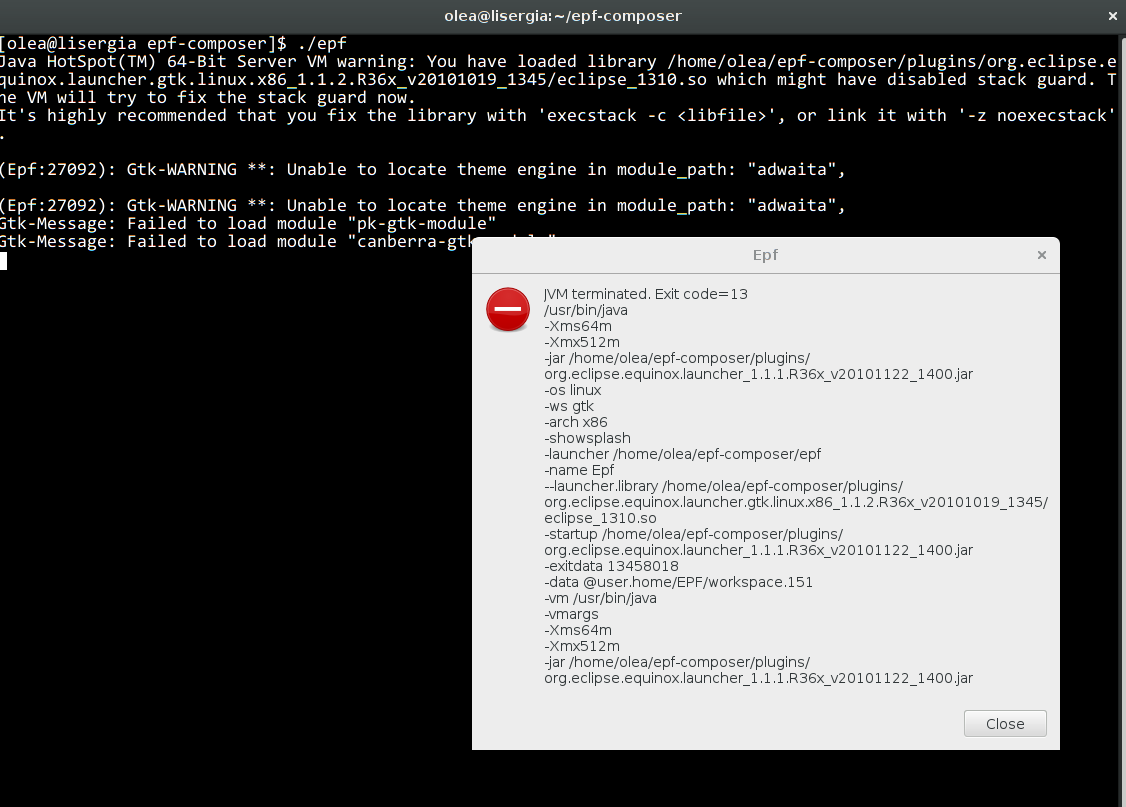
If you, like me, don't know nothing about Eclipse maybe you are doomed because the real problem is everything but clear. What you are having is the EPF application asking for a 32 bits java VM runtime. Nothing more, nothing less. But now is very easy to fix:
- just get a 32 bits java VM
- adjust epf-composer/epf.ini to use it
$ sudo dnf install http://mirror.yandex.ru/fedora/russianfedora/russianfedora/nonfree/fedora/updates/23/x86_64/java-1.7.0-oracle-1.7.0.79-1.fc23.R.i586.rpmand then change ~/epf-composer/epf.ini from this:
-data
@user.home/EPF/workspace.151
-vmargs
-Xms64m
-Xmx512m
to this:
-vm
/usr/lib/jvm/java-1.7.0-oracle-1.7.0.79/jre/bin/java
-data
@user.home/EPF/workspace.151
-vmargs
-Xms64m
-Xmx512m
Please note the precise path may be different in your system but in any case it should point to a 32 bit java binary.
Then you just need to launch EPF and you are ready:
$ epf-composer/epfEnjoy.