«Producir y nutrir,
producir y no poseer,
obrar y no retener,
acrecentar y no regir,
son el misterio de la vida.»
Acceso VPN a la red de CICA usando Fedora
Esta es una entrada de servicio público. Si eres usuario de la VPN de CICA y usas un linux moderno como Fedora (23 en este caso) puede serte de utilidad esta entrada.
CICA usa OpenVPN. Lo ideal sería poder configurar el acceso con NetworkManager, que dispone de la funcionalidad de openvpn, pero en ninguna de mis pruebas he conseguido una configuración operativa, creo que porque NM espera que el certificado de usuario sea emitido por la misma CA que la configuración de la red en cuestión, que no es el caso. El caso es que tras varias pruebas he conseguido conectar desde la CLI contando con la ayuda del CAU de Sistemas de CICA.
Básicamente necesitas:
- tu certificado de usuario de la FNMT
- descargar el certificado CA de TERENA: http://www.rediris.es/scs/cacrt/TERENASSL_PATH.pem
- instalar openvpn: dnf install openvpn
- crear un fichero de configuración semejante a, digamos cica-config.ovpn:
client
dev tun
proto udp
remote vpn.cica.es 1194
resolv-retry infinite
nobind
user nobody
group nobody
persist-key
persist-tun
ca /home/usuario/cica-vpn/TERENASSL2_PATH.pem
pkcs12 /home/usuario/.X509/FNMTClase2CA.p12
auth-user-pass
verify-x509-name vpn.cica.es name
cipher AES-128-CBC
comp-lzo
verb 3
Para poder conectar basta lanzar algo parecido a:
sudo /usr/sbin/openvpn --config /home/usuario/cica-vpn/cica-config.ovpn
Entonces openvpn te solicitará tres datos:
- usuario de la red CICA
- contraseña asociada
- contraseña de acceso a tu certificado X509 emitido por FNMT.
Por dejarlo completamente claro
- /home/usuario/cica-vpn/TERENASSL2_PATH.pem es el certificado que descargas de http://www.rediris.es/scs/cacrt/TERENASSL_PATH.pem
- /home/usuario/.X509/FNMTClase2CA.p12 es tu certificado de la FNMT-RCM exportado probablemente desde tu navegador y protegido por una contraseña.
Que ojalá os sirva.
Publicada la vieja web de TLDP-ES/LuCAS en Github
Desde hace unos buenos años CICA ha tenido la gentileza de alojar el servidor principal del viejo TLDP-ES que los linuxeros más fogueados recordarán como LuCAS.hispalinux.es. Fue imperativo migrar el servicio desde el momento en el que mantenimiento de los sistemas de Hispalinux empezó a colapsar y tuve suerte de que CICA nos ofreciera una VM pequeñita donde alojar lo que se pudo salvar de la web. Claro que ya no era una web importante, pero me dolía mucho dejar que desapareciera el testigo de toda una época y el fruto del trabajo de muchas personas durante muchísimas horas. Tampoco me gusta ir dejando enlaces rotos en la web si puedo evitarlo.
En este mismo proceso de «arqueología» hace ya tiempo que pensé en publicar otro repositorio que usábamos para el mantenimiento de TLDP-ES, el control de versiones con el que queríamos facilitar el trabajo de los voluntarios. Así creé este repo en Github: https://github.com/olea/LuCAS-cvs. Ahora, de la misma manera me he propuesto publicar igualmente el contenido de la web que ahora está disponible también en Github: https://github.com/olea/LuCAS-web.
Prácticamente no es más que un pequeño ejercicio de nostalgia, pero en fin, ahí queda.
Gracias a todos los que hicisteis posible ese gran servicio que fue TLDP-ES/LuCAS. Definitivamente creo que fue algo grande.
Migration to https
I’ve postponed this for eons but it has been the time to migrate the olea.org website to https
Concerned about the privacy, in 2009 the EFF launched the campaign Encrypt the Web aiming all the Web users to migrate to encrypted communications, concerning sysadmins, software programmers and users. Now I did the needed step for my main web server and since there are lots of better documentation on this I’ll just comment briefly some practical details.
First, the tools that helped me with the process:
- Mozilla Observatory, a web application for auditing the https configuration of a given domain.
- Mozilla SSL Configuration Generator, another web application for helping you to fine-tune your website https configuration in the most secure way.
You should try both if you didn’t yet. And thanks a lot to the Mozilla Foundation for creating them.
Second, the migration issues, because the auditing results are pretty bad: 🙈
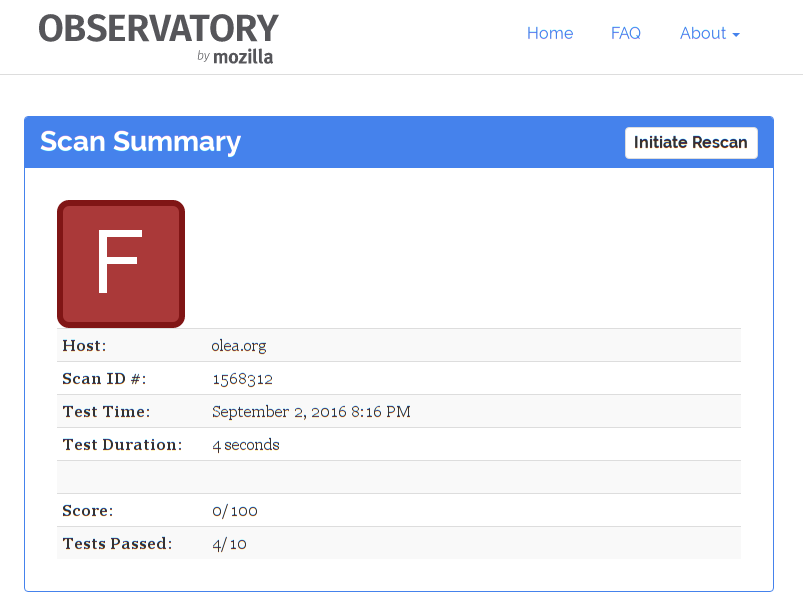
- I’m not sure if my server changes would have some collateral effects in the other hosted webs. I’m not the best sysadmin. Let’s see.
- One of the biggest problem of this migration is how old this server is: a CentOS 5 server which should have been migrated years ago. Still in my ToDo. I think the most negative points of the auditing are consequence of this.
- The other one is the CA of my X509 certificates. For some years I’ve been a promoter of CACert and I’m using this certificates for other services in my server but at this moment the CACert hasn’t been able to get accepted their root certificate with the WebTrust Principles and Criteria for Certification Authorities and the internal crisis of the organization breaks all my hopes for a community driven certification authority X509 compatible. In practice this mean my current X509 certificate is not trustable for everybody who has not added the CACert root certificate by hand. Not a fun thing.
If you are reading these lines then is very probable you know about Letscencrypt which I really love too. This time I have two concerns with Letscrypt: the first this server is too old that should be migrated soon, the second is Letsencrypt is not designed to verify identities. The alternative seems to be to find a free (as beer) or paid CA providing hte verification service.
Well, I know this entry is not very useful for the most of the users, but I’m trying now to write more regularly and to document my routine technical progresses. And as the song says, «que ojalá os sirva».
PD: Finally I deactivated the apache redirection from http to https because using a CACert certificate broke my RPM repository and complicated the access to my web for some users. This is sad.